Clubsmaster – Real-Time Score Overlay Apps
  • Home
  • Score Overlay
  • Products
    • Clubs Management
    • Fixtures Management
    • Cricket Data Integration
  • Pricing
  • Documentation
  • Contact
  • Home
  • Score Overlay
  • Products
    • Clubs Management
    • Fixtures Management
    • Cricket Data Integration
  • Pricing
  • Documentation
  • Contact
X
Clubsmaster – Real-Time Score Overlay Apps

How can we help you?

One App Every Game

Scorer Controller App

8
  • Scorer App Overview
  • Step 1: Select Your Sport
  • Step 2: Connect Your Bluetooth – BLE Setup (Mandatory)
  • Step 3: Choose Scoring Method
  • Step 4: Team Settings
  • Step 5: Match Settings
  • Step 6: Add Player & Begin your Match
  • How to Score a Match (Ball-by-Ball Scoring Interface)

ScoreCast App

7
  • ScoreCast App Overview
  • Getting Started With ScoreCast
  • Recording Menu – Recoding Configuration
  • Live Stream Menu – Configuration
  • Sponsored Menu – Configuration
  • Start Recoding – UI Interface
  • Ideal Refresh for Record Important Information

Introduction & Getting Started

4
  •  Introduction
  • Quick Start Guide
  • Two-Phone Workflow
  • System Requirements & Compatibility

Web App (app.clubsmaster.com)

9
  • Web App Overview
  • Choosing a Plan
  • Creating an Account (Signup)
  • Logging In
  • Dashboard Overview
  • Billing & Plans
  • Team & Member Management (Club Plan)
  • Account & Settings
  • Support & FAQs
  • Home
  • Docs
  • Scorer Controller App
  • Step 4: Team Settings
View Categories

Step 4: Team Settings

2 min read

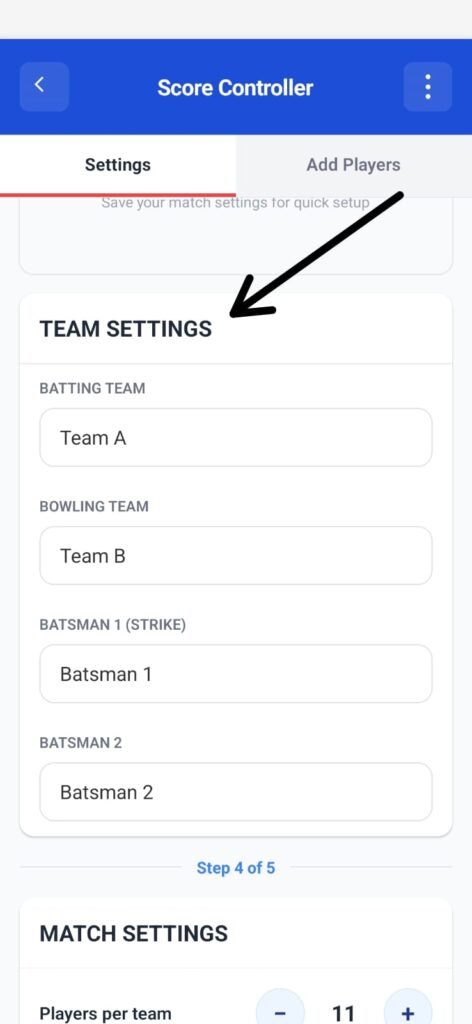
This section explains how to configure teams and opening batsmen before starting a cricket match in the Scorer App.

These settings define who is batting, who is bowling, and who starts the innings.

Overview #

The Team Settings section allows you to:

  • Assign batting and bowling teams
  • Set opening batsmen
  • Prepare the match for live scoring

All information entered here is used immediately once the match begins and appears in:

  • Live scoring screen
  • Score overlays
  • Match records

Team Settings #

Batting Team #

This field defines the team that will bat first.

  • Default value: Team A
  • Tap the field to enter the correct team name

This team’s score will be tracked from the first ball.

Bowling Team #

This field defines the team that will bowl first.

  • Default value: Team B
  • Tap the field to enter the correct team name

The bowling team will switch automatically when innings change.

Opening Batsmen #

Before scoring begins, the two opening batsmen must be defined.

Batsman 1 (Strike) #

This is the batsman who will face the first ball of the innings.

  • Default value: Batsman 1
  • This batsman starts on strike

Make sure this is the correct striker before starting the match.

Batsman 2 (Non-Strike) #

This is the second opening batsman at the non-striker’s end.

  • Default value: Batsman 2
  • Will rotate strike based on runs and overs

Editing Team and Player Names #

  • Tap any field to edit the name
  • Changes can be made before the match starts
  • Once scoring begins, names should not be changed unless absolutely necessary

⚠️ Incorrect names here will reflect in live scoring and overlays.

Match Presets (Optional) #
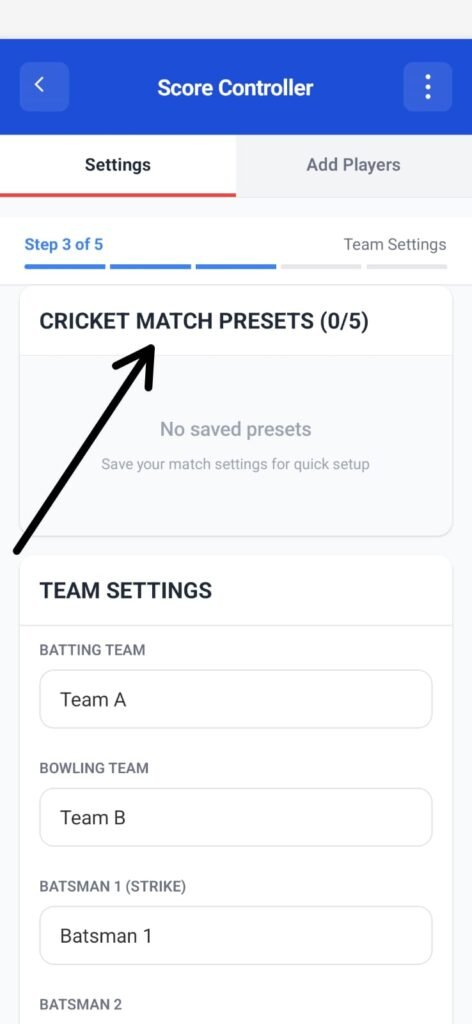
At the top of the screen, you may see Cricket Match Presets.

  • Presets allow saving match settings for quick reuse
  • If no presets are saved, the section will show “No saved presets”
  • Presets are optional and not required to start a match

Before You Continue #

Ensure the following are correct:

  • Batting team name
  • Bowling team name
  • Opening batsman on strike
  • Second batsman name

Once verified, you can proceed to:

  • Add remaining players
  • Configure match rules
  • Begin scoring
What are your Feelings

Share This Article :

  • Facebook
  • X
  • LinkedIn
  • Pinterest
Still stuck? How can we help?

How can we help?

Updated on February 4, 2026
Step 3: Choose Scoring MethodStep 5: Match Settings
Table of Contents
  • Overview
  • Team Settings
    • Batting Team
    • Bowling Team
  • Opening Batsmen
    • Batsman 1 (Strike)
    • Batsman 2 (Non-Strike)
  • Editing Team and Player Names
  • Match Presets (Optional)
  • Before You Continue

Copyright © Clubsmaster all rights reserved.