
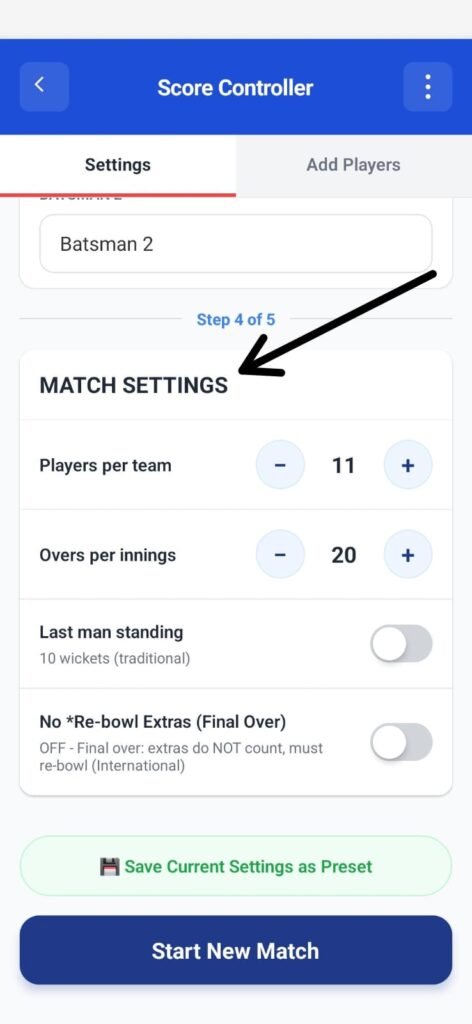
The Match Settings section defines the core rules of the cricket match before scoring begins.
These settings determine how players, overs, wickets, and extras are handled during the match.
Once the match starts, these rules cannot be changed without restarting.
Overview #
From this section, you can configure:
- Number of players per team
- Overs per innings
- Wicket rules (Last Man Standing)
- How extras are counted
- Final over extra-ball behavior
- Save settings as a preset for future matches
Players per Team #
This setting defines how many players are in each team.
- Default value: 11
- Use the + / − buttons to adjust
Examples:
- 11 → Standard cricket
- 8 → Local or short-format matches
- 6 → Box cricket or casual games
⚠️ This value affects when an innings ends (all players out).
Overs per Innings #
This setting defines the total overs to be played in one innings.
- Default value: 20
- Adjust using the + / − buttons
Common formats:
- 5 or 10 overs → Short matches
- 20 overs → T20 format
- Custom → Tournament or local rules
Last Man Standing #
This option controls how wickets are handled at the end of the innings.
OFF (Default – Traditional Rule) #
- Innings ends when 10 wickets fall
- Both batsmen must be available
ON (Last Man Standing Rule) #
- Innings continues until all players are out
- Final batsman can bat alone
Use this when:
- Playing informal matches
- Teams have uneven skill levels
- You want maximum overs played
Count Extras as Legal Balls #
This setting controls whether extras count as legal deliveries.
OFF (International Rule – Default) #
- Wides and no-balls do not count
- Ball must be re-bowled
ON #
- Extras count as legal balls
- Over progresses even on wides/no-balls
Recommended:
- OFF → Official cricket rules
- ON → Casual or time-limited matches
Final Over – Count Extras #
This setting controls extra-ball behavior only in the final over.
OFF (Default – International Rule) #
- Extras in final over do not count
- Must be re-bowled
ON #
- Extras count as legal balls
- Final over may finish faster
Useful when:
- Match time is fixed
- Playing quick tournaments
- Avoiding endless final overs
Saving Match Presets (Optional) #
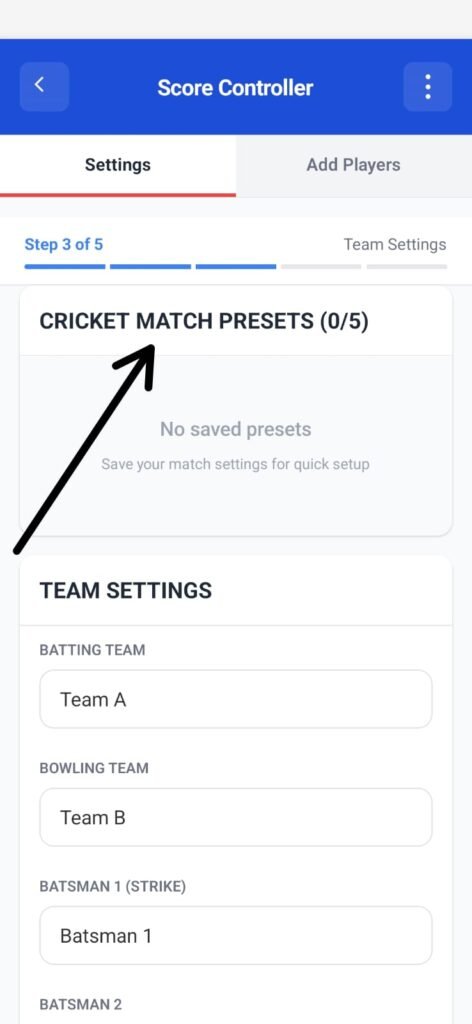
You can save the current match settings for future use.
- Tap Save Current Settings as Preset
- Presets allow instant setup next time
- Up to 5 presets can be stored
Presets are optional and not required to start a match.
Starting the Match #
Once all match settings are verified:
- Tap Start New Match
- The match setup is locked
- Scoring begins immediately
Final Check Before Starting #
Make sure:
- Players per team is correct
- Overs per innings are set properly
- Extra-ball rules match the tournament format


