
This section explains how to configure teams and opening batsmen before starting a cricket match in the Scorer App.
These settings define who is batting, who is bowling, and who starts the innings.
Overview #
The Team Settings section allows you to:
- Assign batting and bowling teams
- Set opening batsmen
- Prepare the match for live scoring
All information entered here is used immediately once the match begins and appears in:
- Live scoring screen
- Score overlays
- Match records
Team Settings #
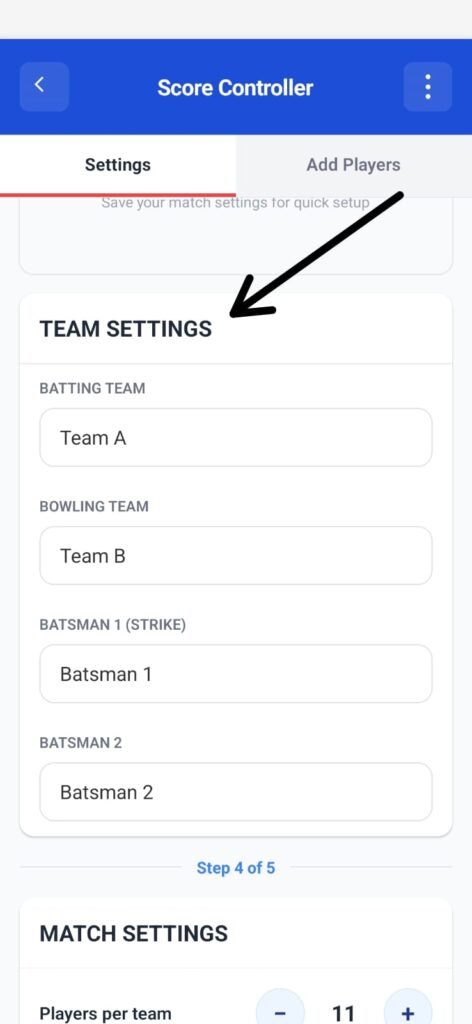
Batting Team #
This field defines the team that will bat first.
- Default value:
Team A - Tap the field to enter the correct team name
This team’s score will be tracked from the first ball.
Bowling Team #
This field defines the team that will bowl first.
- Default value:
Team B - Tap the field to enter the correct team name
The bowling team will switch automatically when innings change.
Opening Batsmen #
Before scoring begins, the two opening batsmen must be defined.
Batsman 1 (Strike) #
This is the batsman who will face the first ball of the innings.
- Default value:
Batsman 1 - This batsman starts on strike
Make sure this is the correct striker before starting the match.
Batsman 2 (Non-Strike) #
This is the second opening batsman at the non-striker’s end.
- Default value:
Batsman 2 - Will rotate strike based on runs and overs
Editing Team and Player Names #
- Tap any field to edit the name
- Changes can be made before the match starts
- Once scoring begins, names should not be changed unless absolutely necessary
⚠️ Incorrect names here will reflect in live scoring and overlays.
Match Presets (Optional) #
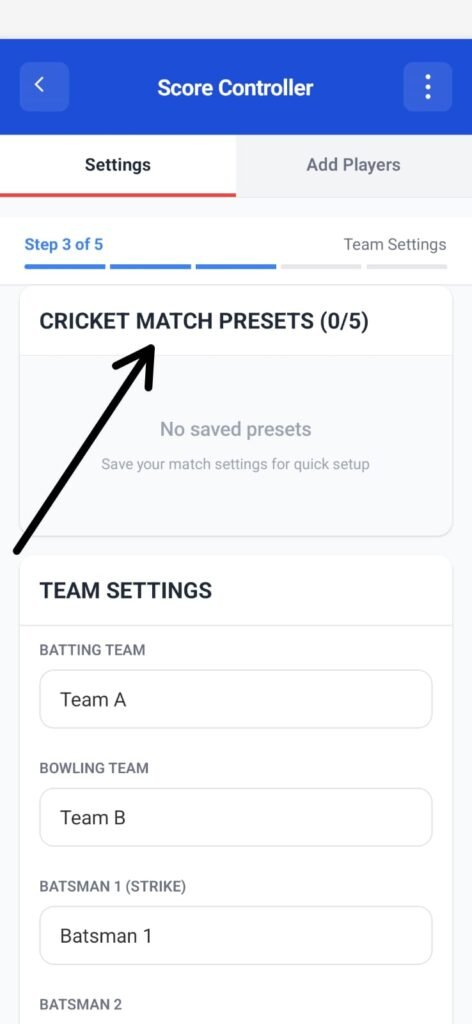
At the top of the screen, you may see Cricket Match Presets.
- Presets allow saving match settings for quick reuse
- If no presets are saved, the section will show “No saved presets”
- Presets are optional and not required to start a match
Before You Continue #
Ensure the following are correct:
- Batting team name
- Bowling team name
- Opening batsman on strike
- Second batsman name
Once verified, you can proceed to:
- Add remaining players
- Configure match rules
- Begin scoring


