
This section explains how to choose a scoring method in the Scorer App before starting a cricket match.
The selected method determines how runs, wickets, and events are recorded during the match.
Overview #
Score Controller currently supports Ball-by-Ball Scoring, which is the core and most reliable scoring method.
This mode is designed for:
- Live match scoring
- Accurate ball-by-ball control
- Seamless score updates during gameplay
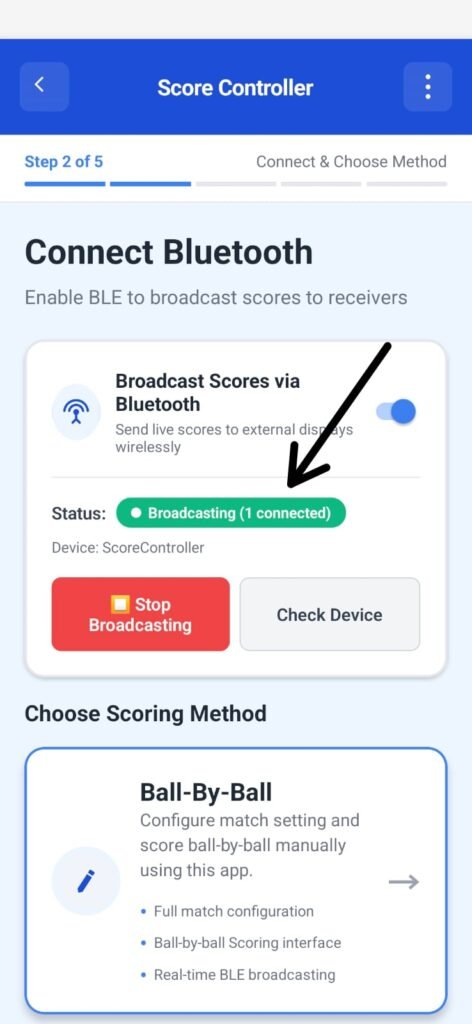
After successfully connecting Bluetooth and seeing Broadcasting (1 connected), the next step is selecting how you want to score the match.
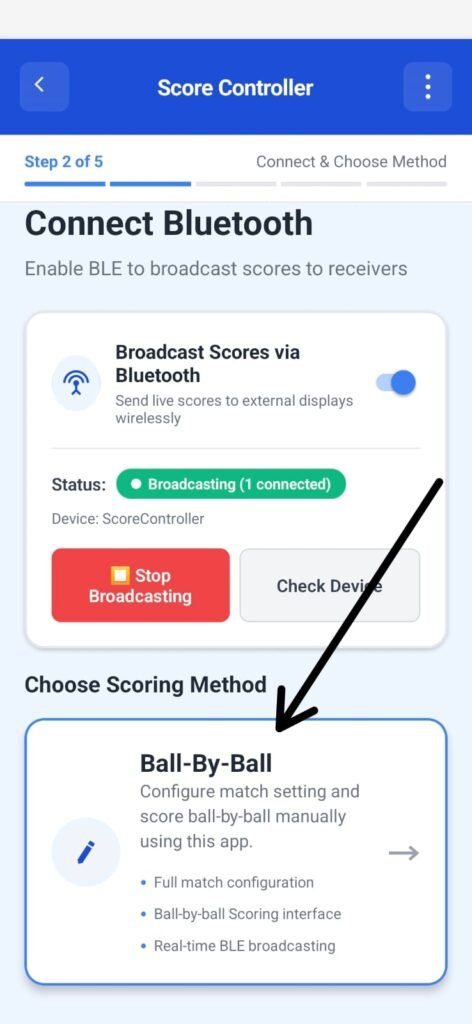
This is done directly on the same screen under Choose Scoring Method.
Available Scoring Method #
Ball-By-Ball #
This is the primary and recommended scoring mode.
It allows the scorer to record every delivery manually with full control.
What this mode supports:
- Complete match configuration
- Ball-by-ball scoring interface
- All run inputs (0,1,2,3,4,6)
- All wicket types
- Extras (Wide, No Ball, Bye, Leg Bye)
- Automatic over and strike management
- Real-time BLE broadcasting to the receiver device
This method ensures accurate, event-level scoring suitable for:
- Tournaments
- Club matches
- Local games
- Any scenario where precision is critical
How to Choose the Scoring Method #
- Ensure Bluetooth status shows:
Broadcasting (1 connected) - Scroll down to Choose Scoring Method.
- Tap the Ball-By-Ball card.
- The app moves forward to:
- Team setup
- Match settings
- Player selection
Important Notes #
- Ball-By-Ball is mandatory for all standard cricket scoring in this app.
- The scoring method cannot be changed once the match begins.
- Scoring works fully offline.
- All match data is saved locally and can be resumed if the app is closed.
What Happens Next #
After selecting Ball-By-Ball, you proceed to Step 4:
Team & Match Setup


